
At a glance: A missing patch identifies work to evaluate. A readiness assessment establishes whether a particular endpoint can safely enter the approved change workflow. Use explicit proceed, review and block decisions, supported by current evidence.
Why a successful scan is not a deployment decision
An engineering workstation can report an applicable operating-system update while carrying an unresolved reboot, insufficient working space and a production application that has not been validated against that update. The scan answers a narrow question about installed state. It does not establish that the complete system is ready to change.
In operational technology, readiness sits between patch selection and execution. Its purpose is to expose conditions that could make the maintenance activity fail, overrun its window or leave operations without a credible recovery route. A useful assessment therefore combines technical checks with the operational context of the asset.
NIST SP 800-82 Rev. 3 discusses OT security in the context of safety, reliability and performance. The readiness gate below is a practical engineering approach informed by that context, rather than a checklist quoted from NIST or a substitute for the asset owner’s change procedure.
Separate applicability, compatibility, readiness and authorization
Keep four decisions distinct. Applicability asks whether the package belongs on the installed operating-system or application baseline. Compatibility asks what vendor information and representative testing establish about the proposed combination. Readiness asks whether this endpoint and its dependencies are prepared now. Authorization identifies who may approve the change and under which conditions.
An endpoint may be technically ready while its application qualification is unresolved. A vendor-qualified package may still be blocked by a failed recovery check. Combining all four decisions into a single green indicator conceals the reason a deployment should wait.
Record the evidence timestamp alongside each result. A readiness result collected before a configuration change or a failed backup may no longer support the planned operation. Reassess material changes and define a final pre-change check within the maintenance procedure.
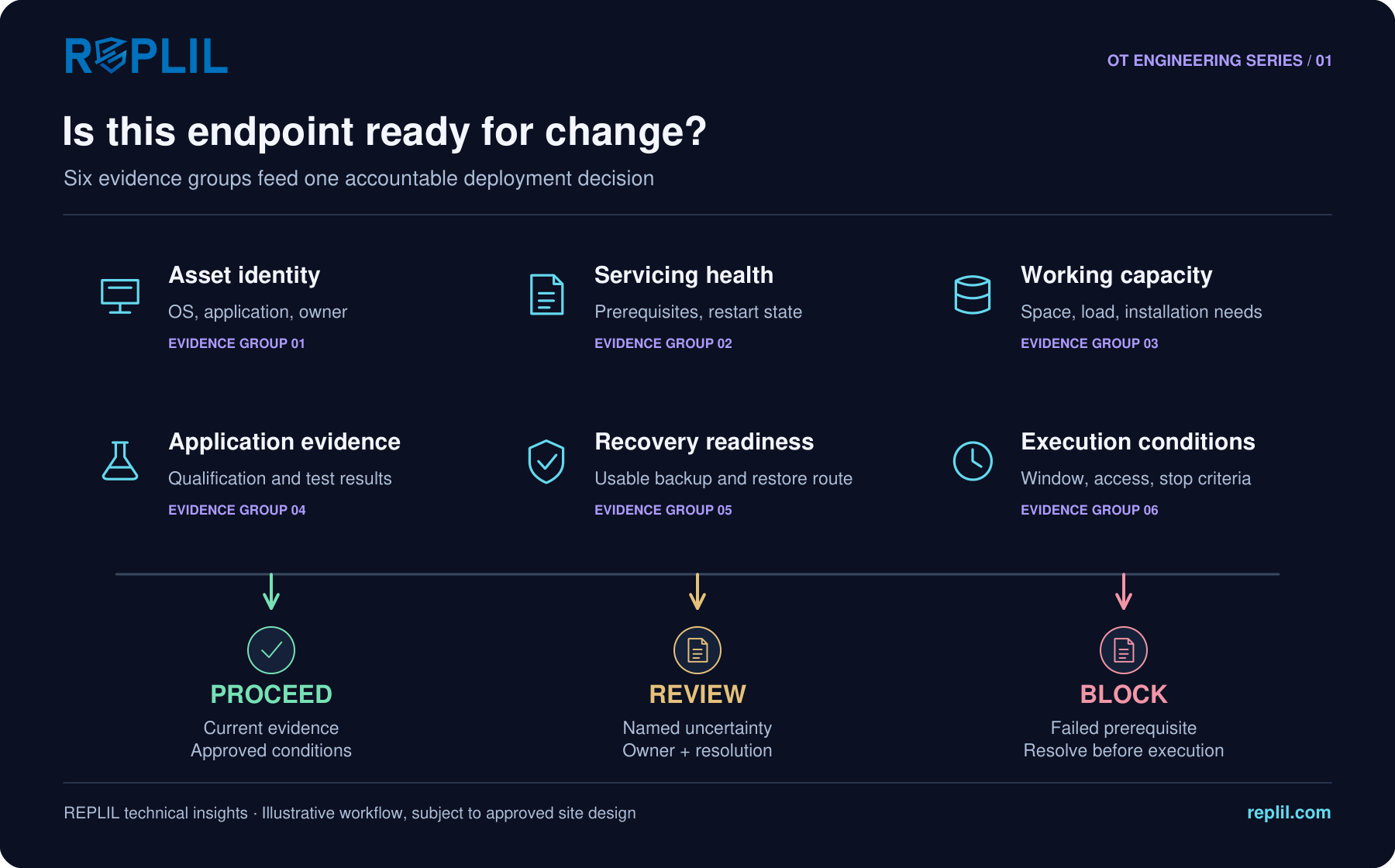
Build a readiness gate around six evidence groups
Start with asset identity: hostname, stable asset identifier, operating-system edition and build, architecture, application versions, role, site and owner. Resolve duplicates before correlating results. A standby server, historian and operator station may share an OS while needing different acceptance checks.
Check servicing health and package prerequisites. Review pending reboots, incomplete installations, relevant update-service health and known installation failures. Microsoft documents the role of servicing-stack updates in installing Windows updates; exact prerequisites depend on the target release and package. Do not apply a generic cleanup or repair command to a production controller workstation simply because a scan reports an issue.
Review working capacity and operational performance. Consider installation and rollback working space, log growth, CPU and memory pressure, and the recovery time budget. Set thresholds from the package requirements and representative site testing, not a universal percentage copied across all devices.
Confirm application dependencies and recovery. Identify the services, interfaces, accounts and partner nodes required after restart. Reference the applicable vendor qualification and test record. Verify backup age, scope, accessibility and the restoration procedure. A VM snapshot alone does not establish application-consistent recovery or protect against loss of the underlying datastore.
Finally, validate execution conditions: approved target group, owner availability, maintenance duration, restart sequence, access path and stop criteria. For redundant systems, use the vendor-approved sequence and confirm the remaining node can sustain the required operation before changing its partner.
Use decisions that tell the engineer what to do next
Proceed means that the defined checks passed, evidence is current and the authorized change conditions remain valid. It is permission to enter the next approved step, not a promise that installation will succeed.
Review means that a named uncertainty needs an accountable decision. Examples include an application version missing from the qualification reference, unexplained performance drift or a recovery test that does not cover the planned rollback. Assign an owner, required evidence and resolution deadline. Avoid an indefinite amber queue.
Block means a non-negotiable prerequisite failed: the approved recovery material cannot be accessed, the target identity is uncertain, a required package prerequisite is absent or the maintenance window cannot accommodate the defined stop point. Remove the blocker or obtain a formally approved alternative treatment; do not silently relabel it as a warning.
Worked example: a historian with a pending restart
Consider an illustrative historian server scheduled for an operating-system update. The package is applicable and the relevant vendor reference is available. The initial assessment finds a pending restart from an earlier installation, low installation working space and a restore procedure whose estimated duration exceeds the remaining outage allowance.
The correct outcome is not automatic deployment with three warnings. The site separates the previous change from the proposed one, investigates the pending state, restores adequate working capacity through an approved procedure and revises the recovery window. It then repeats the affected checks.
The example contains no universal disk-space or timing threshold. Those values belong to the actual package, platform, process and recovery design. Its lesson is that readiness should change the plan when the evidence warrants it.
Keep the assessment attached to the change record
Retain the target baseline, assessment time, check results, exceptions, supporting references, approver and final decision. After deployment, add installation outcome, restart state and application verification. An installation exit code cannot demonstrate that an operator workflow, historian query or supervisory connection still works.
Useful measures include the proportion of planned changes with current readiness evidence, repeated blocker categories and deployments postponed before execution because a prerequisite failed. Interpret these as improvements in decision quality. A higher proceed rate is not inherently better if it comes from weakening checks.
REPLIL Industrial Patch Manager brings inventory, endpoint readiness, patch correlation and deployment evidence into the patch workflow. Pair the assessment with REPLIL OPS application testing where appropriate, and use site change control to authorize execution. Technology makes the evidence easier to review; the accountable operational decision remains with the asset owner.
A practical pre-change review
Before releasing a target group, ask: Are the exact assets and application baselines known? Are package prerequisites and servicing state resolved? Is working capacity adequate for installation and recovery? Does the test evidence match the intended change? Can the recovery procedure be executed within the agreed limits? Are the owner, window, access path and stop criteria confirmed?
If an answer is unknown, record the uncertainty explicitly. A defensible decision is one that another engineer can reconstruct from the evidence, including why the team proceeded, deferred or stopped.
Explore the REPLIL workflow
For the wider guidance, read our practical guide to NIST SP 800-82 Rev. 3. Talk to REPLIL about your environment.
Sources and scope
- NIST SP 800-82 Rev. 3: OT security context
- Microsoft: Windows updates and servicing-stack considerations
- NIST SP 800-40 Rev. 4: patch management planning
Technical guidance and illustrative examples prepared by REPLIL. Adapt the workflow to the actual platform, vendor requirements and approved site procedures. References do not imply endorsement or certification. Third-party names and trademarks belong to their respective owners; no affiliation is implied.